Every job. Every deadline. One board.

FieldNova turns incoming work into tracked jobs, puts them in front of the right technician, and warns you before a deadline slips.
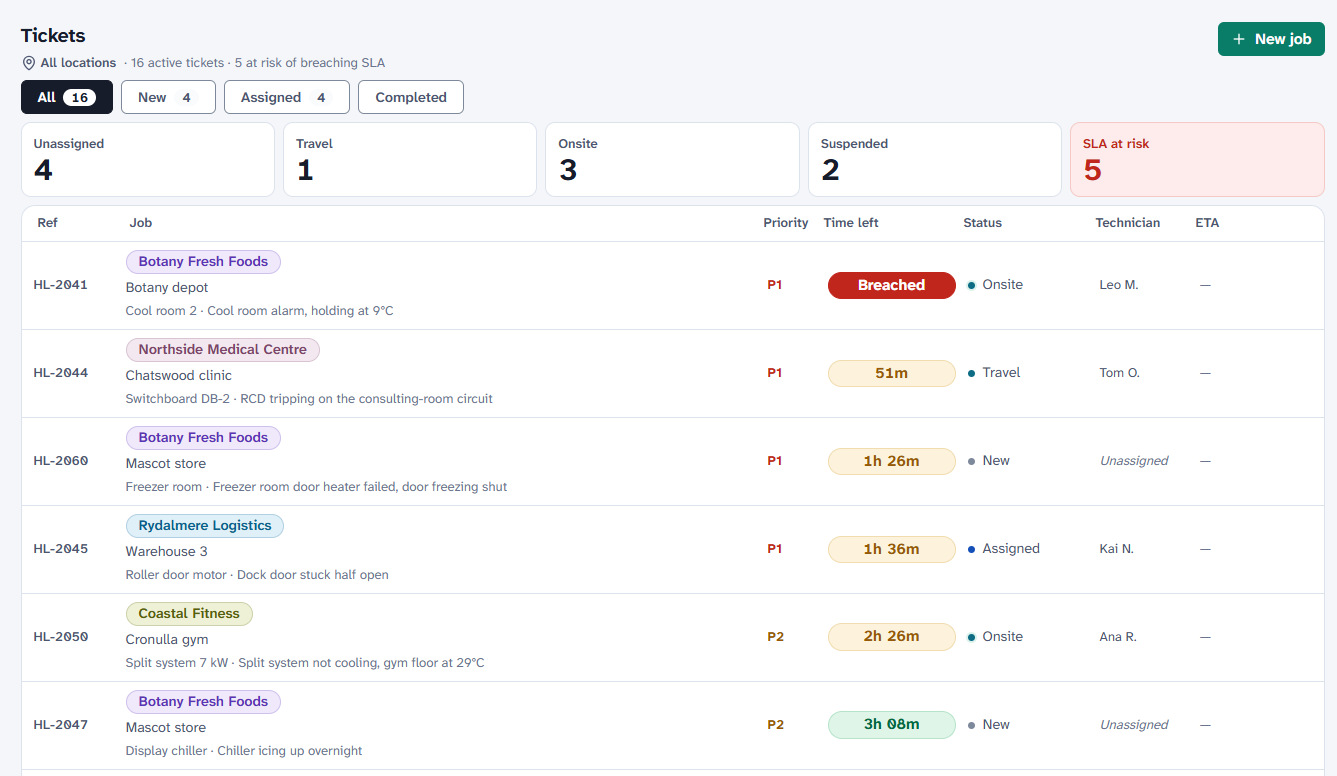
The FieldNova board in the office, jobs ordered by how close they are to their deadline, beside the same job on a technician's phone.

How a job moves through FieldNova

From the customer's email to their signature, without anyone retyping it.

  1. The email arrives

    FieldNova reads it and drafts the job. Phone-in work is typed straight in.

    URGENT: Cool room 2 alarm, Botany depotfacilities@botanyfresh.example
  2. The clock starts

    Each customer's fix deadline counts down from when the email landed.

    HL-2041 Botany Fresh1h 26m
  3. A technician takes it

    Their phone buzzes the moment the office assigns the job.

    FieldNovaNew job: HL-2041, Botany depot
  4. They head out

    Each status tap records where they were, so the office knows.

    At siteLeo Marsh, Botany, 9:36 pm
  5. The customer signs

    Photos, parts and a signature close it, and the closure email is ready to send.

    Dana Price✓ Signed

What FieldNova does today

Everything here is working now, for every customer, on every plan.

  • Jobs from email

    Customer emails become jobs without retyping, and replies land on the same job.

  • A board that counts down

    Live deadlines, with at-risk and breached work at the top.

  • An app for technicians

    Installs from the browser to the home screen. No app store.

  • Alerts on assignment

    A push on Android and iPhone the moment a job is theirs.

  • The whole history

    Every status change, check-in and photo on one timeline.

  • Your own address

    yourcompany.fieldnova.com.au, in your colour, by invitation only.

Coming next

  • Quoting

    Price a job and send the quote from the same record.

  • Invoicing

    Bill completed jobs without typing them up again.

  • Scheduling calendar

    Plan the week's visits, technician by technician.

  • Preventive maintenance

    Regular service visits that raise themselves.

  • Reports

    Response and fix times, by customer and by month.

  • Offline mode

    Keep working on site where there's no signal.

What it looks like

Real screens, from a demo company.

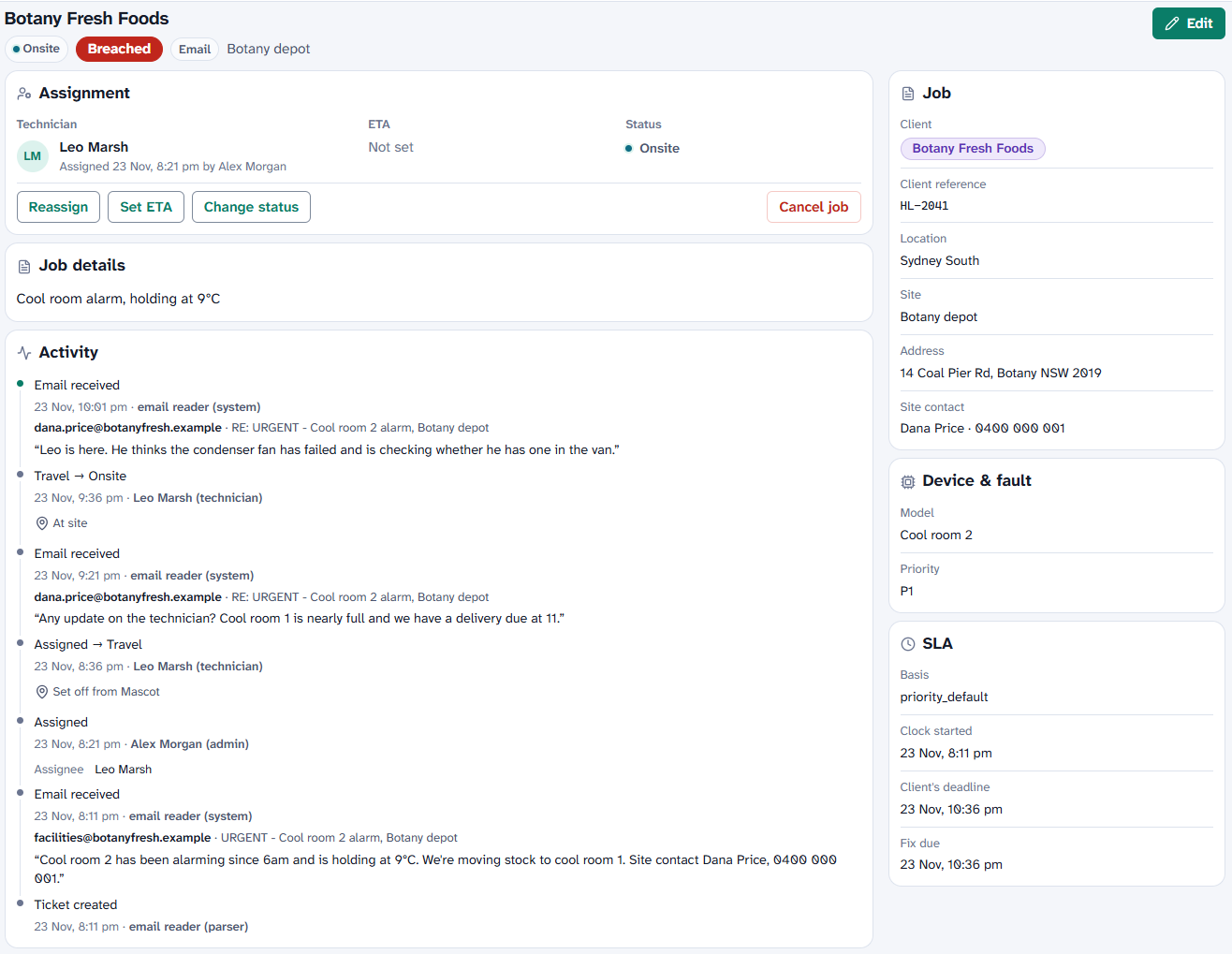
A job's detail page: customer, site, deadline, assigned technician and its activity timeline.
Every job in one place, from the first email to the signature.
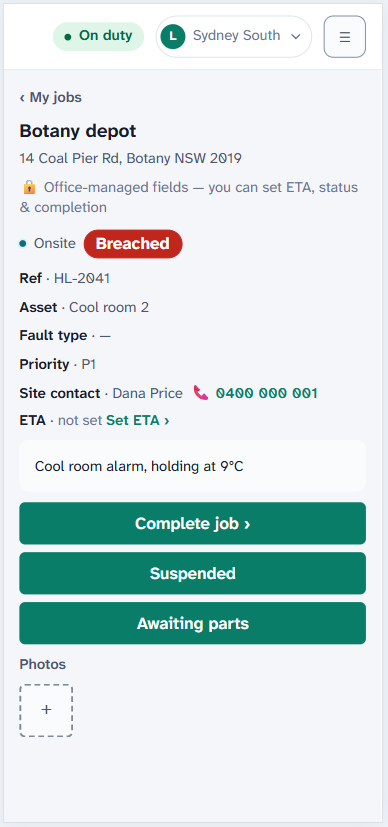
The technician app on a phone: a job with its address, site contact, deadline status and the complete, suspended and awaiting-parts actions.
The job card on the technician's phone.
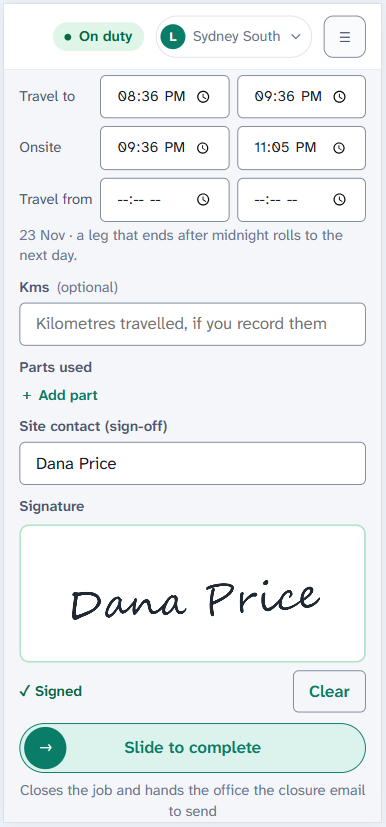
The technician app closing a job: travel and onsite times filled in from the job, the site contact named, their signature on the pad, and slide to complete.
Sign-off on site.

Plans

Every plan has every feature. Pick the size of your team.

Sandbox

5 users

2 locations

Try it with a small crew.

  • Jobs from email
  • A board that counts down
  • The technician app
  • Alerts on assignment
  • The whole job history
  • Your own address and colour
Talk to us

Standard

25 users

10 locations

For teams across several regions.

  • Jobs from email
  • A board that counts down
  • The technician app
  • Alerts on assignment
  • The whole job history
  • Your own address and colour
Talk to us

See it on jobs like yours

Tell us how work reaches you today, and we'll show you FieldNova running it.

  • We reply within one business day.
  • A 30-minute demo, run on jobs like yours.
  • No obligation, and nothing to install.

Prefer email? enquiries@fieldnova.com.au

Your data is hosted in Sydney, Australia.

Isha Technologies Pty Ltd collects your name, email, company and message only to reply to your enquiry. They are sent to us by email and not stored in a database. To ask about your details, email enquiries@fieldnova.com.au.